Pages

Subscribe:
Showing posts with label Computer. Show all posts

Wednesday, January 14, 2015

Folder security

உங்கள் பதிவுகளை மற்றவர்கள் திருடாமல் இருக்க...!!
FOLDER களை மற்றவர்கள் CUT,COPY, PASTE செய்வதை தடுக்க நமது கணிணியில் பல கோப்புகளை வைத்திருப்போம். அவற்றில் நமக்கு தேவையான அல்லது முக்கியமான பல கோப்புகள் இருக்கும். நமக்கே தெரியாமல் சிலர் அழிக்கவோ அல்லது நமக்கு தெரியாமல் காப்பி செய்து கொள்ளவோ முடியும்.
இதை தடுக்க Prevent என்ற இந்த மென்பொருள் பயன்படுகிறது. இந்த மென்பொருளை நிறுவிய பின் இயக்கினால் கீழ்க்கண்ட www.puradsifm.com
image "1" தோன்றும். இதில் Define Hotkey என்பதில் உங்களுக்கு எளிதான அல்லது நினைவு கொள்ளகூடிய வகையில் எதாவது Key தேர்வு செய்து கொள்க. உதாரணமாக Ctrl + B அல்லது Ctrl + C என ஏதாவது தேர்வு செய்து கொள்க. தேர்வு செய்த பின் Activate என்ற பட்டனை அழுத்துக.
பின் கீழ்க்கண்ட image 2 தோன்றும். இதில் OK கொடுத்த பின் நீங்கள் எந்தவொரு கோப்புகளையும் கட், பேஸ்ட், காப்பி மற்றும் அழிக்கவோ முடியாது.மேலும் கோப்பின் மேல் Right Click செய்து பார்த்தாலும் அனைத்து வசதிகளும் முடக்கப்பட்டிருக்கும்.
image "3" உள்ள படத்தை பார்க்க. உங்களுக்கு கோப்புகளை அழிக்க வேண்டுமானால் முன்பு தேர்வு செய்த key அழுத்தினால் போதும். அதாவது முன்னர் Ctrl +B கொடுத்திருந்தால் அதை தற்போது அழுத்தினால் மீண்டும் பழைய நிலைக்கு வந்து விடும். தற்போது நீங்கள் எந்தவொரு கோப்புகளையும் கட்,பேஸ்ட்,காப்பி மற்றும் அழிக்க முடியும். இந்த மென்பொருளை தரவிறக்கம் செய்ய,


Image by FlamingText.com

Monday, June 24, 2013

How to solve Shortcut Folder in USB


பின் தோன்றும் விண்டோவில் cd\ என்று உள்ளிடவும்.

அடுத்து எந்த ட்ரைவோ அந்த ட்ரைவினை உள்ளிட்டு என்டர் பொத்தானை அழுத்தவும். நான் E: என்று குறிப்பிட்டுள்ளேன். எனவே e: என்று உள்ளிட்டு என்டர் பொத்தானை அழுத்தவும். உங்களுடைய ட்ரைவ் மாறுபடும்.

அடுத்து dir/ah என்று உள்ளிட்டு பின் என்டர் பொத்தானை அழுத்தவும். தற்போது அந்த ட்ரைவில் உள்ள கோப்புகள் பட்டியலிடப்படும்.

அடுத்து attrib *. -h -s /s /d என்று உள்ளிட்டு பின் என்டர் பொத்தானை அழுத்தவும். என்டர் பொத்தானை அழுத்தியவுடன் கோப்புகளை தனியே பிரிக்கும் வேலை ஆரம்பம் ஆகும்.

இறுதியாக exit என்று உள்ளிட்டு பின் என்டர் பொத்தானை அழுத்தவும். தற்போது காமான்ட் பிராம்ப்ட் மூடப்படும்.

இப்போது உங்களுடைய யுஎஸ்பி ட்ரைவினை திறந்து பார்க்கவும். அப்போது உங்களுடைய கோப்புகள் அந்த ஸ்டார்கட் கோப்பு வைரஸ்களிடம் இருந்து தனியே பிரிக்கப்பட்டிருக்கும். அதனை நீங்கள் எடுத்து பயன்படுத்திக்கொள்ள முடியும்.

இந்த முறையானது ட்ரைவில் உள்ள அனைத்து கோப்புகளையும் தனியே பிரித்தெடுக்க முடியும்.இதே முறையை பயன்படுத்தி குறிப்பிட்ட ஒரு கோப்பினை மட்டும் பிரித்தெடுக்க முடியும். அதற்கு attrib கமெண்ட் உள்ளிடும் போது கோப்பின் பெயரையும் சேர்த்து உள்ளிட்டால் போதுமானது. tcinfo.psd என்னும் போட்டோசாப் பைலை மட்டும் ட்ரைவில் இருந்து தனியே மீட்டெடுக்க வேண்டுமெனில்  attrib tcinfo.psd -r -a -s -h என்று உள்ளிடவும். இப்போது நீங்கள் குறிப்பிட்ட கோப்பு ட்ரைவில் இருக்கும் பட்சத்தில் கோப்பானது மீட்டெடுக்கப்படும்.

Image by FlamingText.com

Thursday, September 13, 2012

பெண்கள் கணினி போலே


பெண்களை பலர் பல விதமாக வகைப்படுத்தினர். சாமுத்திரிகா இலட்சணம், அத்தினி, சங்கினி, பத்தினி, சித்தினி அது இது என்று சொல்வார்கள். அது  அந்தக் காலம் இது Computer காலம். கணனிப்படி பெண்களை இப்படித்தான் வகைப்படுத்தலாம், இதில் எந்தப் பெண்ணை உங்களுக்குப் பிடிக்கும்?

Hard Disk girls : நிரந்த உறவை விரும்பும் பெண்கள்

RAM girls: உறவைத் தொடர்பு முடிந்தவுடன் மறக்கும் பெண்கள்.

Screen Saver girls: சைட் அடிக்க மட்டும்

Software girls: விசயம் நிறைய இருக்கு ஆனால் புரிந்து கொள்ள முடியாது.

Monitor girls: உங்களைக் கண்காணித்த படியே இருக்கும் பெண்கள்.

Window girls: அடிக்கடி மாறுவதாகச் சொல்வார்கள். ஆனால் அதே பழைய பிரச்சனைதான்

Speaker girls: வளா வளா என்று எந்த நேரமும் பேசிக் கொண்டே இருக்கும் பெண்கள்

Application girls: ஒரு காரியத்திற்கு மட்டும் பயன்படும் பெண்கள்.

Virus girls: உங்கள் மனதைக் கிறங்கடித்து உங்களை நிர்மூலமாக்கும் பெண்கள்.

Anti Virus girls: எந்த நேரமும் பல்லி சொல்ற மாதிரி ஏதாவது சொல்லி மிரட்டும் பெண்கள்

Search Engine girls: உங்கள் பணப்பையைக் காலி செய்யும் பெண்கள்.

Website girls: ஊர் வம்பெல்லாம் தெரிந்து வைத்துக் கொண்டு சொல்லாமல் பிகு பண்ணும் பெண்கள்.

Browser girls: உங்களைப் பற்றி அறிய அதிகம் துருதுருவிக் கேள்விகள் கேட்கும் பெண்கள்.

Internet girls: தேடிப் பிடிப்பது சிரமமான பெண்கள்

Keyboard girls: தொட்டல் சிணுங்கிகள்

Microsoft girls: சிறிய மென்மையான பெண்கள். ஆனால் பெரிய பிரச்சனை

Apple girls: தாங்கள் தனித்துவமானவரகள் என்று பீத்திக் கொள்ளும் பெண்கள்.

Server girls: உங்களைத் தாய் போல் கவனிக்கும் பெண்கள்.

Multimedia girls: வாய், கண், கை போன்றவற்றால் ஒரேயடியாக உரையாடும் பெண்கள்


Image by FlamingText.com

Friday, February 17, 2012

Photoshop change to Black and white

போட்டோஷாப்-28 குறிப்பிட்ட வண்ணத்தை தவிர்த்து மற்ற இடத்தை கருப்பு வெள்ளையாக்க..

சிவப்பு வண்ணத்தை கொண்ட பூக்களின் படம் திறந்துள்ளேன். இதில் சிவப்பு வண்ணம் தவிர்த்து மற்ற பகுதியை கருப்பு வெள்ளை படமாக்கப்போகிறோம்.

படம்.2. சிவப்பு வண்ணத்தை மட்டும் தேர்வு செய்ய செலக்ட்-கலர் ரேஞ் தேர்வு செய்ய வேண்டும்.


படம்.3. கலர் ரேஞ் விண்டோ திறந்துள்ளது. இதில் சிவப்பு நிறத்தை தேர்வு செய்யவும்.


படம்.4. சிவப்பு நிறம் தேர்வாகிவிடட்து.


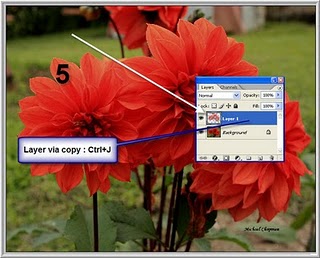
படம்.5. பிறகு தேர்வு செய்த பகுதியை மட்டும் புதிய லேயரில் காப்பி செய்யவேண்டும். இதற்கு சார்ட் கட் கீயில் கண்ட்ரோல் + J கீக்களை அழுத்த புதிய லேயரில் தேர்வுப்பகுதி மட்டும் காப்பியாகி இருக்கும்.


படம்.6. இறுதி நிலைக்கு வந்துள்ளோம். லேயரில் பேக் கிரவுண்டில் உள்ள லேயரை டீசேச்சுரைட் (Desaturate ) செய்யப் போகிறோம். அதற்கு படத்தில் காட்டியுள்ளபடி Image- Adjustment- Desaturate தேர்வுசெய்ய வேண்டும்.


படம்.7. மேற்கண்ட முறையை சார்ட் கை கீயின் மூலமாக
Shift + Ctrl +U கீக்களை அழுத்த கருப்பு வெள்ளையாக மாறும். சேமித்து வர வேண்டியது தான் பாக்கி.
இதில் வெவ்வேறு வண்ணத்தை தேர்வு செய்து பழக புதிய இதைவிட சிறந்த படங்கள் கிடைக்கலாம்.


போட்டோஷாப் சூரியோதயம் Photoshop

மேலே இரண்டு படங்கள் உள்ளது. இதில் உதாரணமாக படம் ஒன்று நமக்கு பிடித்த படம்.ஆனால் படம் இரண்டில் உள்ளது போல் சூரியோதயம் இருந்தால் நன்றாக இருக்கும் என்று நினைத்தால் கவலையே பட வேண்டாம்.ஒரே நிமிடத்தில் அதை செய்து விடலாம்.அதை எப்படி என்பதை பார்ப்போம். 

Monday, December 5, 2011

Core i3, Core i5, Core i7

Intel will stop selling Core 2 Duo and Core 2 Quad in 2010. Core is the new range of Intel processors.

Core i3:
* Entry level processor.
* 2-4 Cores
* 4 Threads
* Hyper-Threading (efficient use of processor resources)
* 3-4 MB Catche
* 32 nm Silicon (less heat and energy)

Core i5:
* Mid range processor.
* 2-4 Cores
* 4 Threads
* Turbo Mode (turn off core if not used)
* Hyper-Threading (efficient use of processor resources)
* 3-8 MB Catche
* 32-45 nm Silicon (less heat and energy)


Core i7:
* High end processor.
* 4 Cores
* 8 Threads
* Turbo Mode (turn off core if not used)
* Hyper-Threading (efficient use of processor resources)
* 4-8 MB Catche
* 32-45 nm Silicon (less heat and energy)


Wednesday, September 28, 2011

Protect Your System From Others

உங்களது மென்பொருளை பிறர் பயன்பாட்டிலிருந்து பாதுகாக்க..
 
கணணியில் ஒன்றுக்கு மேற்பட்டவர்கள் பயன்படுத்தும் போது சில பாதுகாப்பு குறைபாடுகள் வரலாம். நீங்கள் நிறுவியுள்ள மென்பொருளை வேறு யாரும் பயன்படுத்தி விடக்கூடாது என்று எண்ணலாம்.

Tuesday, September 13, 2011

Useful Registry Hacks

Before keeping hands in registry if your regisrty is disabled first enable it
Registry editing has been disabled by your administrator:

Trouble:
Whenever I open Run and type regedit and press enter a message prompt appears saying "Registry editing has been disabled by your administrator".

E-Speaking: Control Your PC Through Your Voice


An easy software solution to enable you to control your computer, dictate emails and letters, and have the computer read documents back to you. e-Speaking – Voice Recognition software using your voice to command and control your computer. Reduce or eliminate mouse clicks or keyboard input. Use it to enhance your computing experience by providing an additional input to the computer.

Tuesday, June 7, 2011

How To Lock Folder

Lock Any Folder Completely Through 1 Command

 1.Make a Folder in D drive & rename it to D:\format\File1


2.Now Open command Prompt in Start menu.


3.Type "Attrib +s +h D:\format\File1" without Quotes & press enter

4.This Command wil Just hide all the files & folders which is present in the folder "File1"

5.To make Visible,Don't Worry

Just enter "Attrib -s -h D:\format\File1" without Quotes & press enter.Thats it !u did woww


Saturday, June 4, 2011

Lock Desktop Icon

You have arranged your desktop to look nicely with your wallpaper. Presently comes someone and mess up the nice arrangement. To lock your desktop icons into place, first arrange it carefully the way you want it to be, then open up the registry editor.
 
Go to HKEY_CURRENT_USER\Software\Microsoft\Windows\
CurrentVersion\Policies\Explorer.
 
Right-click in the right pane and select New, DWORD Value name NoSaveSettings and press the Enter key. Right-click on the new NoSaveSettings item and select Modify. Enter 1 in the Value data box. After this, whenever you restart Windows, your settings will return to their current state.


Delete Recyclebin and Revert

start->run->gpedit.msc-> user configuration ->desktop->remove recycle bin from desktop->double click->change it not configured to enable->apply and ok.
now come to start->run->gpupdate.exe and press enter.

your recycle bin icon is gone from desktop nad you will need to revert your settings for get that back.

after reverting setting make sure to run gpupdate.exe command. 


Add my link to your site or blog for daily updation:::
____________________________________________________________________


Simply copy and paste the code:::
<a href="http://www.desinghraja.blogspot.com" title="All Computer Tips & Tricks" target="_blank">
<img src="http://www.weebly.com/uploads/6/5/8/3/6583354/8346585.jpg" alt="Computer Tips and Tricks" width="300" height="60" /></a>
____________________________________________________________________
 

Shutdown your Computer using Command

Here is a trick to shutdown your computer  at a specific time.
you can shutdown your computer without the use of any software.
There are two type of command u can use for this,,,,,
OK we will see how to dooooooooooo:::::

Start=>Run

Type Code:        at 11:35 shutdown -s


To cancel or Abort the shutdown:


Type Code:        shutdown -a

Type  Code:  “shutdown –s –m\\computername –t60”. This command will shutdown the computer on network if you have administrative access..


Alternative method to create a shutdown timer:::

Step 1: Right click on your desktop and choose “New=>shortcuts”.
Step 2:
In the box that says “Type the location of the shortcut”,
type in “shutdown -s -t 3600” without the quotation marks and click next.
Note: 3600 are the amount of seconds before your computer shuts down. So , this means 3600 seconds = 60 mints (1 hour).

To abort or cancel the shutdown:
To make an abort key to stop the shutdown timer just create another shortcut and make
the “location of the shortcut” to ” shutdown -a” without the quotes.


Add my link to your site or blog for daily updation:::
____________________________________________________________________
Simply copy and paste the code:::
<a href="http://www.desinghraja.blogspot.com" title="All Computer Tips & Tricks" target="_blank">
<img src="http://www.weebly.com/uploads/6/5/8/3/6583354/8346585.jpg" alt="Computer Tips and Tricks" width="300" height="60" /></a>
____________________________________________________________________

Put Your Name in place of AM / PM

You can change Am/Pm and place your name,
It is very very simple,
Ok வாங்க change பண்ணலாமா,,,,?

Step-1:- Navigate to -> Start -> Control Pannel -> Regional and Language Option -> Click on Customize -> Go to TIME Tab -> Change AM symbol and PM symbol from AM and PM to ur name -> Apply -> Ok ...
Did It change? If not, follow step-2 below.
 
Step2:- Now go to time in taskbar and Double Click it to open "Date and time property" ...Look place where time changes in digital form i.e. 02:47:52 AM , click to arrow to cnage the AM or PM by selecting and press arrow. It will Show ur name or name that was entered by u, 
Apply ->OK

The last important step is,,

 ***
Step3:- In future u want some tricks just transfer money to my account::::::


Lock and Unlock Folder withour software

How to lock Your private folder using any software... if want to do this follow this tricks:
  • First select Your folder which you want to lock. Suppose paint is my private folder and it stored into E:\ drive.
  • In the same drive ( eg. E:\) you need to create two bat file. Create a new text file there & Open it in note pad. Type in:

    Quote:
    ren paint paint.{21EC2020-3AEA-1069-A2DD-08002B30309D}
    Save it in as lock.bat
  • Again open another text file and type
    Quote:
    ren paint.{21EC2020-3AEA-1069-A2DD-08002B30309D} paint
    Now save this as a unlock.bat .

Now you can see 2 batch files lock and unlock.Double click on Press lock.bat and the folder paint's icon will change to control panel and you cannot view its contents.

Double click on unlock.bat and you will get back your original folder.

Note: Edited for Clarity.

Also if you want lock/unlock a sub folder, you need to create the bat files in the root folder and not in the root drive. ie. For locking C:\files\mysecret create the bat files in C:\files\.

Thursday, May 19, 2011

How to chat in MS-DOS

Chat with Friends through MS-Dos Command Prompt :-

Open Notepad and write this code as it is.....!

@echo off
:A
Cls
echo MESSENGER
set /p n=User:
set /p m=Message:
net send %n% %m%
Pause
Goto A

Now save this as "Messenger.Bat".

And Double click the .bat file.

Now, type the IP Address of the computer which you want to contact and press enter


Start Chatting.......!


Wednesday, May 18, 2011

Hide all drives from My Computer


Step 1. Go to Start -> Run. 

Step 2. Type regedit

Step 3. Now go to:
            HKEY_CURRENT_USER\Software\Microsoft\Windows\CurrentVersion\Policies\Explorer

Step  4. Now in the right pane, create a new DWORD item and name it NoDrives (it is case sensitive).

Step  5. Now modify it's value and set it to 3FFFFFF (Hexadecimal) .

Step  6. Now restart your computer. 

Step  7. So, now when you click on My Computer, no drives will be shown(all gone...).

To enable display of drives,simply delete this DWORD item that you created. Again restart your computer. You can now see all the drives again,


Tuesday, May 17, 2011

How to Remove Short-cut arrows from the Shortcut icons

while we r trying to make a shortcut of a file,along with the icon it also shows a shortcut thumbnail... here is the tricks to remove that arrow.

   1. Click Start.
   2. In the Search Box, type regedit and press Enter.
   3. locate the following key: HKEY_CURRENT_USER\Software\ Microsoft\Windows\CurrentVersion\Explorer
   4. In the right pane locate the subkey Link.
   5. Right-click it and modify its value from 18 00 00 00 to 00 00 00 00
   6. Exit the regedit and restart your computer. Create a new shortcut and have fun!


note: do this carefully and i am not responsible for the errors u make !!

Monday, May 16, 2011

Have some fun : Create the Matrix pattern

i will tell you,how u can create the green matrix pattern as in the film.
follow these procedure.

# type the following in the Notepad.

@echo off
color 2
:start
echo %random% %random% %random% %random% %random% %random% %random% %random% %random% %random% %random% %random% %random% %random%
goto start

then save it as matrix.bat


please note that,save it as .bat extention not as .txt extension

# then double click on the file. u can see as in the picture.


Friday, May 6, 2011

how to speed up Internet connections


1. Click Start, then Run

how to speed up Internet connections by setting gpedit.msc

2. In the run box, type gpedit.msc

how to speed up Internet connections by setting gpedit.msc


how to speed up Internet connections by setting gpedit.msc

4. after performing the limit reservable bandwidth Properties window, select enable, and change bandwidth limit to 0%


how to speed up Internet connections by setting gpedit.msc


Over - Success

Search This Blog